 superviewer
See what your AI agent just made.
Just tell your agent to send it over. It lands on your desktop, you mark up what is wrong, and the notes go straight back.
Ship faster with your team
Plan, build, and launch, all in one place. No more juggling five tools.
Get startedYour agent builds it.
It just appears.
There is no command to type. You say it the way you would say it to a person, and your agent puts the result on your desktop. No digging through Finder, no opening a browser, no switching apps.
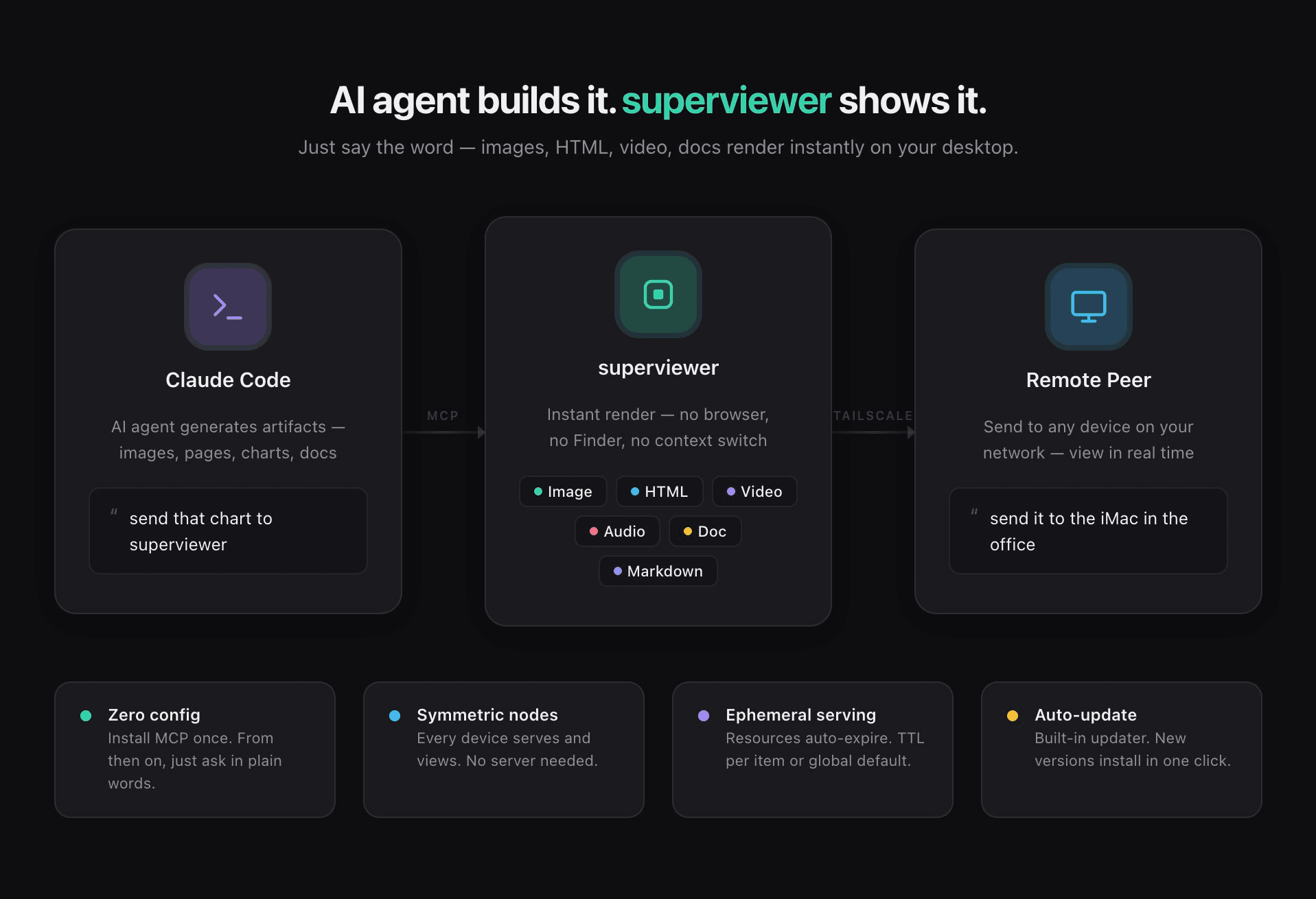
Every device serves
and views. No server.
Send artifacts to any machine on your network over Tailscale or LAN. Resources are served ephemerally with a configurable TTL, and every render lands in a searchable feed history.
Stop describing
what you meant.
Drop a pin, drag a region, or draw straight on the render, then type the note right there. Tell your agent to check the feedback and it reads every note, fixes them one by one, and marks each one done. A note pinned to the exact spot beats "the header looks off" every time.
See Pro pricing →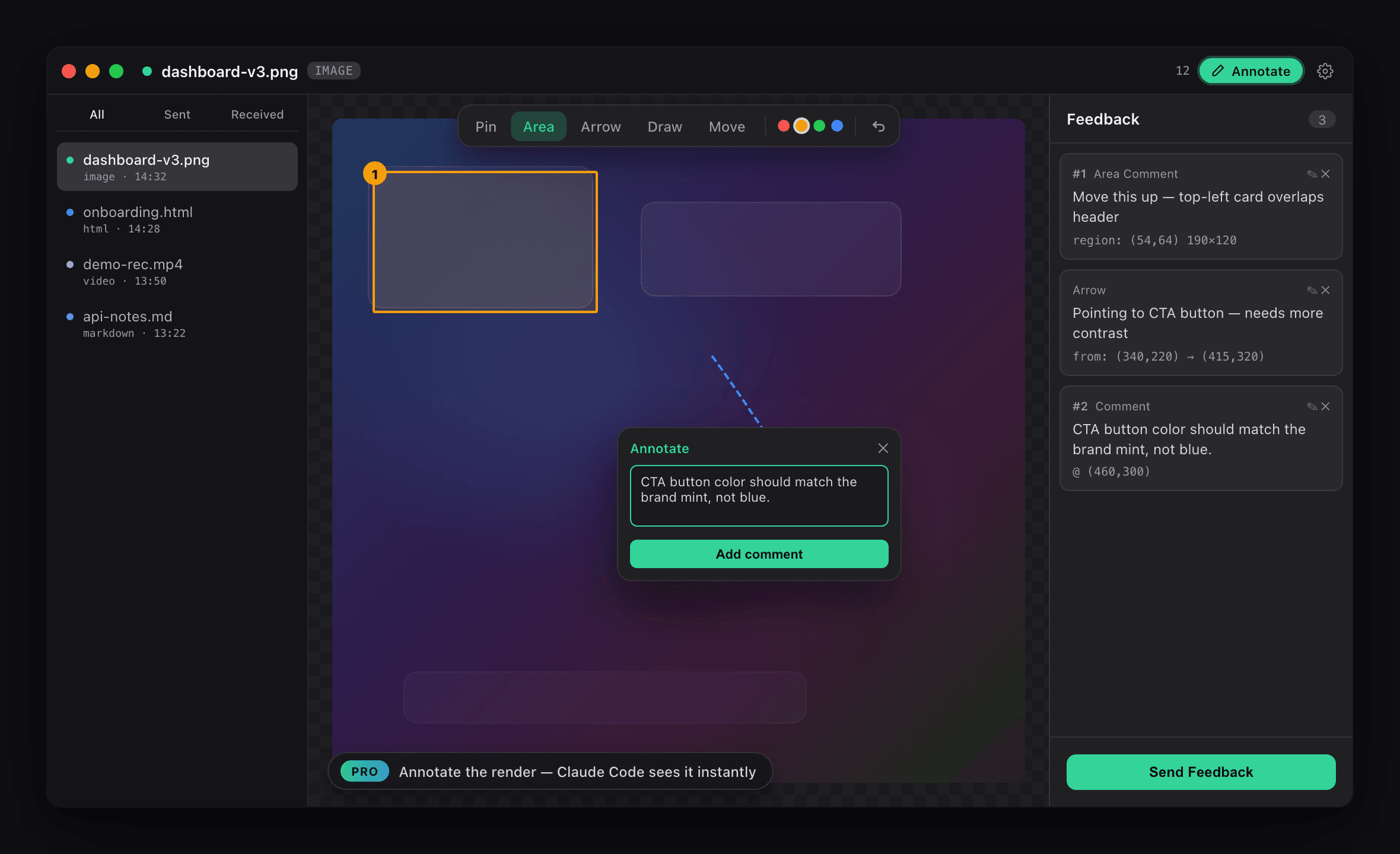
Built for the way agents work
Instant Render
View images, HTML, video, audio, markdown, and documents the moment they're created. No browser required.
Nothing to Memorize
Just tell your agent to send it over, in plain words. No command to type, nothing to configure after install.
Annotate (Pro)
Drop pins, drag regions, or draw straight on the render, then type the note right where the problem is.
Feedback Loop (Pro)
Ask your agent to check the feedback. It reads every note, fixes them one by one, and marks each one done.
Split View
Compare up to four files side by side in one window instead of flipping between them.
Markdown, Properly
In-app links, an outline, real tables, and Mermaid diagrams rendered inline.
Symmetric Nodes
Every device is both a server and a viewer. No central server, no cloud dependency, no account.
Remote Peers
Send artifacts to any machine on your network over Tailscale or LAN, and pull feedback back from them.
Feed History
A searchable, filterable timeline of everything you've rendered, split into received and sent.
Pay once, own it forever
No subscription, no account, no server costs to pass on.
- Instant render: image, HTML, video, audio, doc, markdown
- Screen and window capture
- Split view, up to 4 files side by side
- Remote viewing over Tailscale or LAN
- TTL-based ephemeral serving
- Searchable feed history and auto-update
- Annotate renders: pin, region, arrow, draw, text, timestamp
- Your agent reads every note and fixes them one by one
- Notes get marked done as they are handled
- Pull in feedback left on your other machines
- Download artifacts, including ZIP
- Perpetual license, 1 year of updates
Free is the viewing loop (agent renders, you look). Pro is the feedback loop (you mark it up, the agent acts). Consuming what is already yours stays free, forever.
Frequently asked questions
What is superviewer?
superviewer is a desktop viewer, built with Tauri, that instantly renders artifacts your AI agents generate: images, HTML, video, audio, markdown, and documents. Instead of hunting through Finder or opening a browser, you just tell your agent to send it over and the content appears right on your desktop. With Pro you can also annotate what you see and hand those notes back to the agent. It's shipping for macOS today, with Windows and Linux on the way.
How does it work with Claude Code?
Install superviewer, open Settings → MCP, and click Install. That's the entire setup. After that you just talk normally: "send that chart to superviewer", "show me the Chrome window", "put these three files side by side". Your agent handles the rest and the result renders instantly. There is no command or syntax to learn.
Do I have to type a command or remember any syntax?
No. superviewer connects to your agent over MCP, so the agent decides when to send something. You describe what you want in plain language, the same way you would ask a person, and it shows up.
How much does it cost?
The app is free, forever: rendering, capture, split view, remote peers, feed history, and downloads are all included. Pro is a one-time $19 purchase that unlocks the feedback loop: annotating renders and having your agent act on those notes. No subscription and no account.
What exactly does Pro unlock?
Annotation on any render (pin, region, arrow, draw, text, and video timestamps), and the ability for your agent to read those notes and work through them. It also includes multi-peer feedback, so you can pull in annotations left on your other machines. The license is perpetual and includes one year of updates.
Why annotate instead of just describing the problem?
Because "the header looks off" costs your agent a round trip to guess where you mean. A pin carries the coordinates, the element, and your note together, so the agent gets structured feedback and edits the right thing on the first try.
Which file types are supported?
Images (png, jpg, gif, webp, svg, avif, and more), HTML, video (mp4, mov, webm, mkv), audio (mp3, wav, flac, m4a, ogg), and documents (pdf, markdown, txt, json, csv). Markdown renders with in-app links, an outline, tables, and Mermaid diagrams.
Do I need a server or cloud account?
No. superviewer is fully local and symmetric: every device both serves and views. There is no central server and no account to create. A Pro license is activated with a key, not a login.
Can I send artifacts to another machine?
Yes. Tell your agent to send it to another machine by name and it goes to that peer over Tailscale or LAN. You can also check which build a peer is running before you rely on it. Resources are served ephemerally with a configurable TTL.
Which platforms does superviewer support?
superviewer is available for macOS today. Windows and Linux builds are in progress.
superviewer, ready when you are.
Install once, connect Claude Code, and every artifact your agent makes shows up instantly. Free forever. Add Pro for $19, once, when you want to annotate and hand feedback back.
Download for macOS