Why We Built Pomotiki - Focus Was the Missing Ticket
Jira had all our tasks, but none of our focus. We didn't need another tool. We needed a flow - pick one thing, lock in, finish it. Here's why we built Pomotiki.
Why we built Pomotiki - focus was the missing ticket
Your Jira board is overflowing with tickets. Epics, sprints, story points - it's all there. But you still can't answer one question: "What did I actually focus on today?"
The problem wasn't a lack of tools. It was the lack of a flow. Checking tasks in Jira, setting a timer in one app, jotting notes in another - every switch broke concentration before it even started. We wanted a single place where you pick one task, lock in for 25 minutes, and mark it done. Two clicks, not five apps.
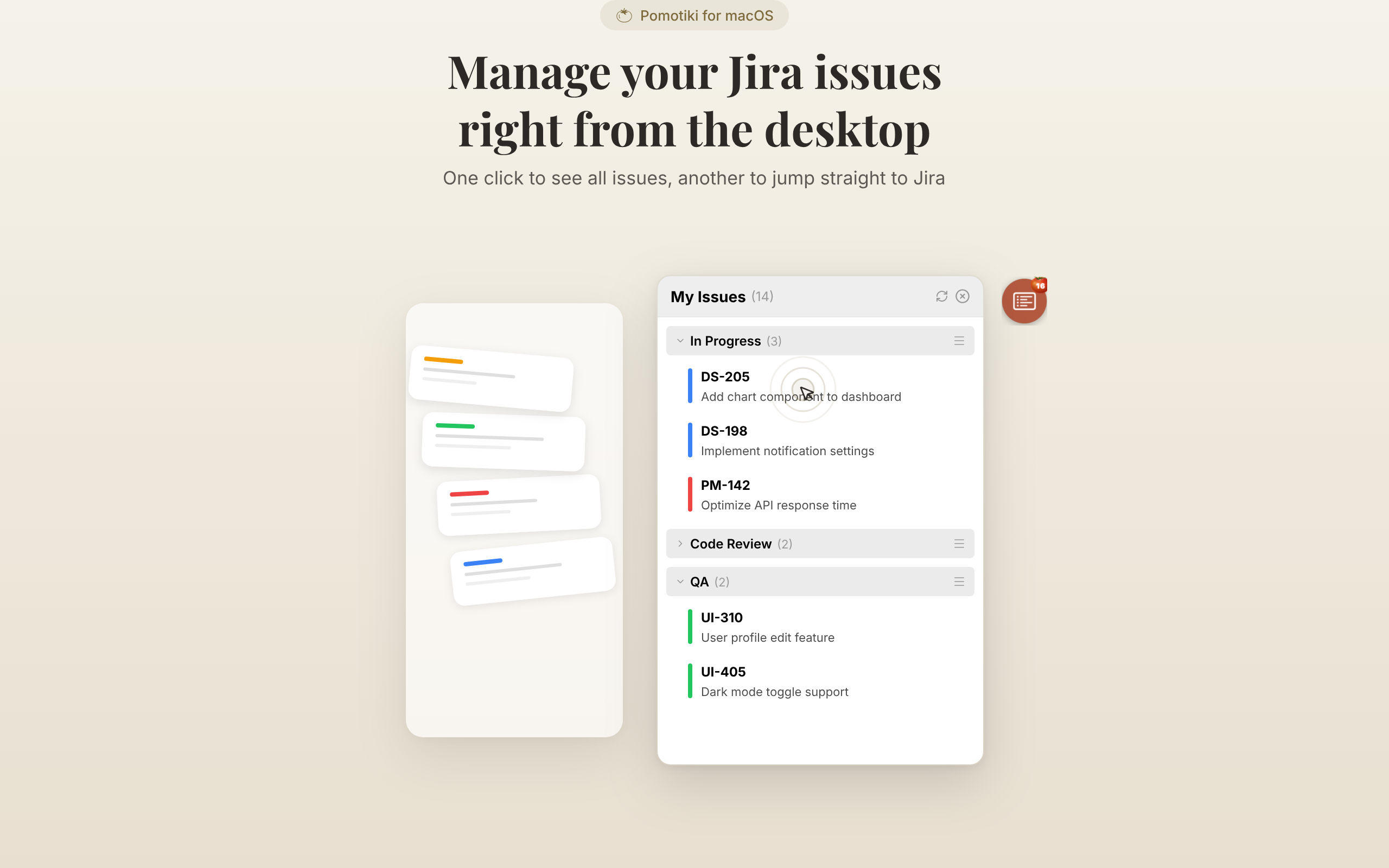
So we built a small floating icon. That's Pomotiki.
The tomato that won't go away
We could have tucked it in the menu bar. Clean, out of the way. But here's the thing - if it's out of sight, it's out of mind. That's how humans work.
The floating icon follows what we call "moderate presence." A tomato sitting on one side of your screen, no bigger than a coin, draggable anywhere you want. You barely notice it, but it keeps reminding you: "Hey, you were focusing on something." It doesn't demand attention. It doesn't interrupt. It just stays there, quietly holding you accountable.
Expand when needed, minimize usually. That's the whole philosophy.
Going native on macOS
We didn't need to reinvent what macOS could already do.
- Always-on-top across all Spaces (desktops) - one line of native code
- Under 30MB total - Electron alternatives eat hundreds of megabytes
- System-level behavior like "close on outside click" and native notifications - no hacks needed
We wanted something that feels like it belongs on your Mac, not something that tolerates it.
A timer that was breaking focus
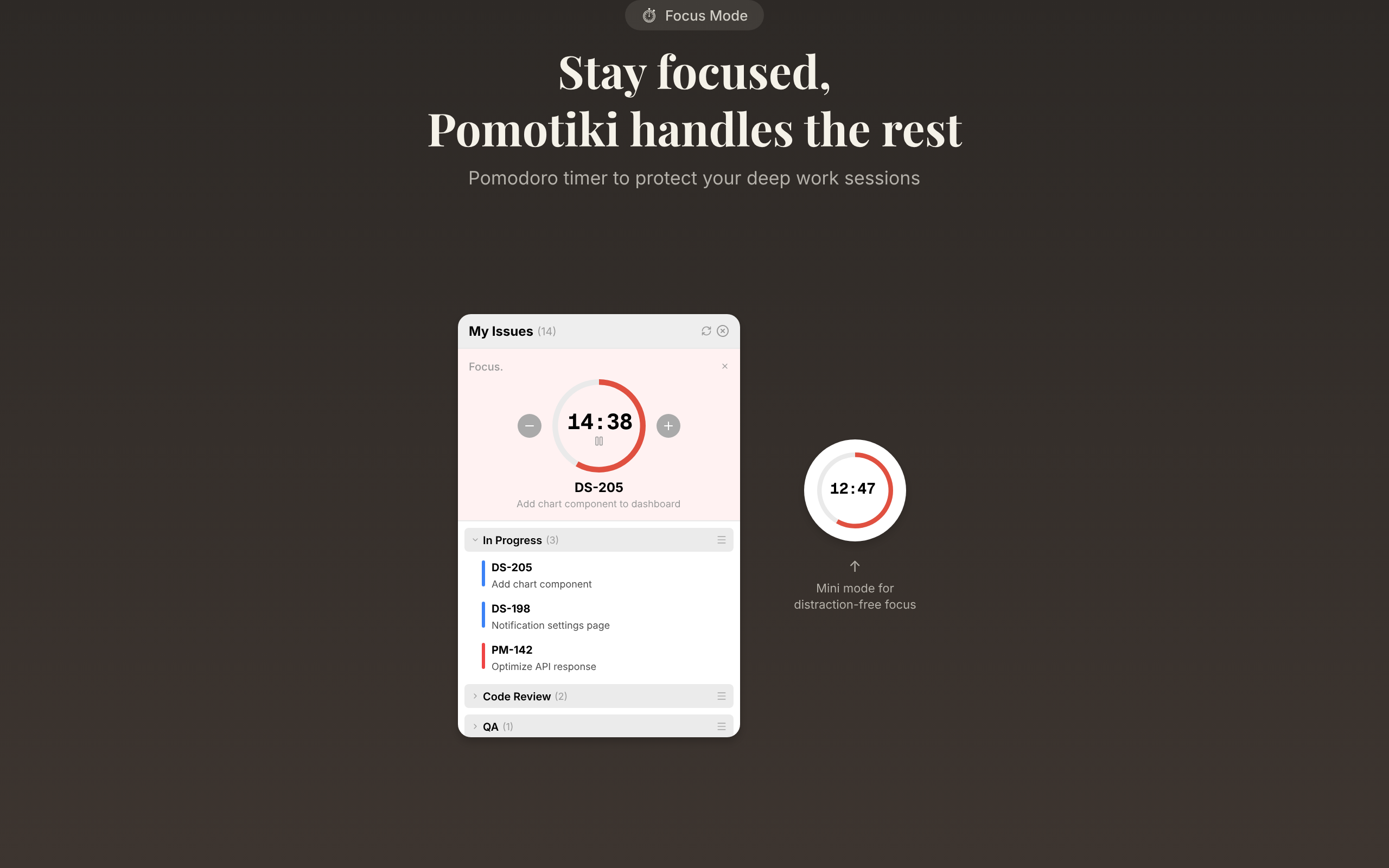
Here's an irony we didn't expect. The Mini Focus View, a timer overlay designed to help you concentrate, was actually covering the work area and breaking focus instead.
The fix came from using our own app every day. We added a transparency slider so users can dial in exactly how visible the timer should be. Then came a subtle touch: the view stays semi-transparent normally and becomes fully opaque only when you hover over it. Background noise most of the time, crystal clear when you're curious.
Here's what the focus timer looks like in action - notice how it stays compact and out of the way while still keeping your current task visible.
It's the kind of detail you only think of when you eat your own cooking.
Color over text
When you're juggling five Jira projects, your eyes catch a color strip faster than they read a label. So we made project identification color-first, text-second. Each project gets a distinct color bar, and scanning your task list becomes instant pattern recognition rather than reading.
We also spent a lot of time on information density. Not everything is shown at once. Buttons for "Start Focus" and "Hide" only appear on hover, keeping the default view focused on the one task you chose. The goal is to reduce decisions, not add them.
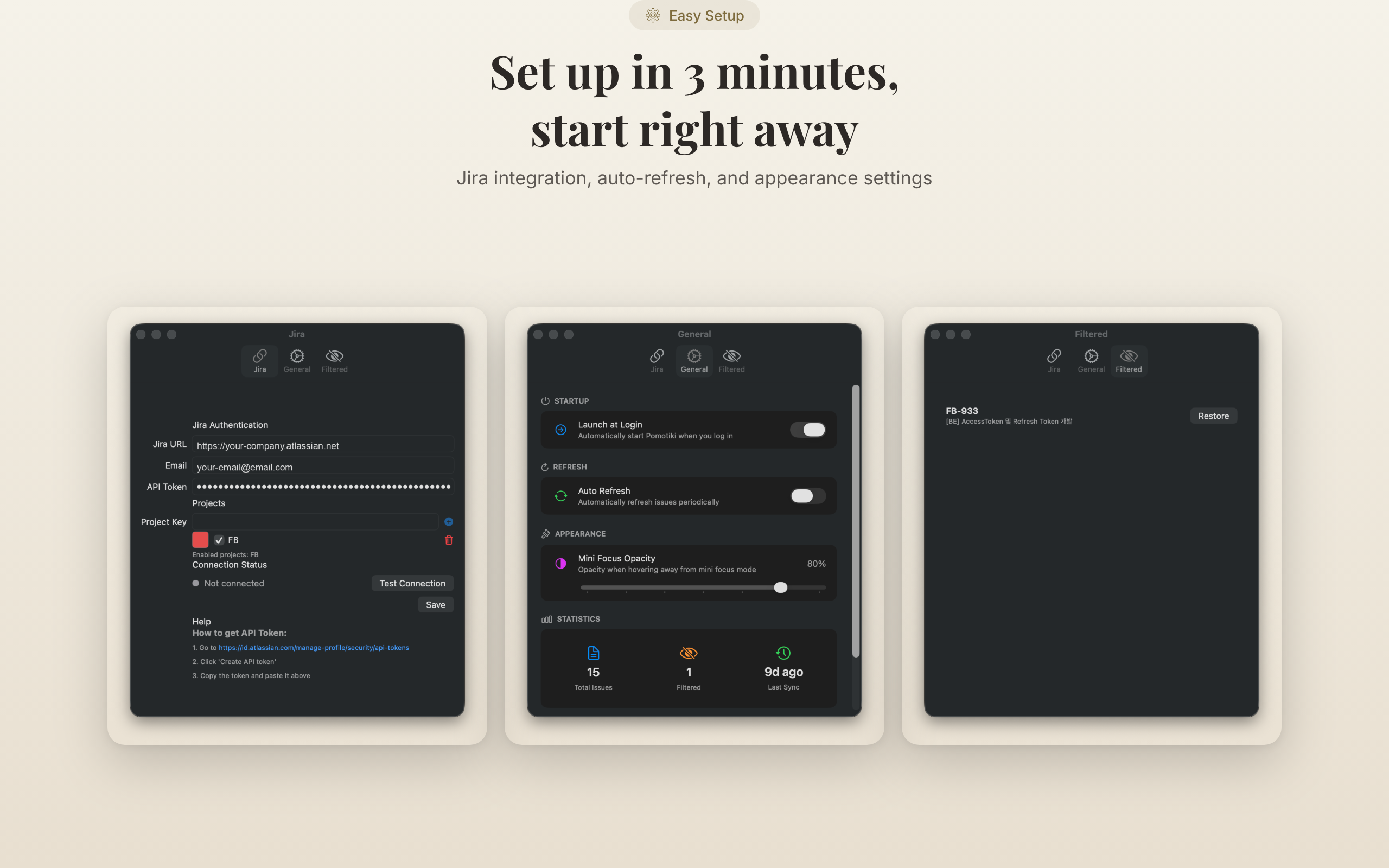
You can configure project colors, Jira connection, and timer preferences from the settings panel - everything lives in one place.
The Jira API problem
Every project has that one technical headache. For us, it was Jira's pagination format.
Jira returns responses in a mix of the old Offset-based format and the new Token-based format, sometimes both in the same payload. We built an adapter layer we call the "Seawall" that accepts whatever format comes in and normalizes it into a unified internal model. It checks both Token and Offset fields, handles flexible "last page" detection, and keeps everything downstream consistent. If Jira changes their API again tomorrow, we update one layer and nothing else breaks.
Hiding issues isn't procrastinating
Jira backlogs accumulate zombie issues. Tickets that are technically open but haven't been touched in months, tasks that were superseded by other work, bugs that no longer reproduce. They're noise, and noise costs mental energy even when you're not actively looking at it.
The Hide Issue feature filters out tickets that should have been closed three sprints ago, so what's left on your screen is what actually matters right now.
What actually changed
After months of daily use, the shift is subtle but real. It's the system doing the work, not willpower. A running 25-minute timer acts as a signpost. When you start to drift, checking Slack or opening a random tab, the tomato catches you. No alarm. Just presence.
The other change is how you evaluate your day. Instead of counting tickets closed, you check how many focused sessions you completed. It's a measure of immersion density rather than throughput, and it turns out that's a much more honest metric for knowledge work.
What's next
Three things on the roadmap:
- Focus statistics - visualize work patterns over time. When are you most productive? Which projects consume the most deep work?
- Auto-complete - move a Jira issue to "Done" when the timer ends. Close the loop without an extra click.
- Beyond Jira - the "tiki" in Pomotiki hints at a bigger vision: a focus hub that works with GitHub Issues, Linear, and whatever tools your team already uses.
Pomotiki - DoDraft
Your tasks live in Jira — but where does your focus live? Pomotiki starts with a small icon floating on your screen. Click it to see your Jira issues, pick one to focus on, and start a Pomodoro timer. 25 minutes. One task. Total focus.

Pomotiki is a free macOS app. No subscriptions, no accounts. Just connect your Jira board, pick a task, and start focusing.

Enjoyed this post?
Subscribe to our newsletter and get notified when we publish new articles.