Best Pomodoro Apps for Mac in 2026: 7 Tested Picks for Developers and Teams
Compare 7 best Pomodoro timer apps for Mac in 2026. From Jira-integrated Pomotiki to open-source TomatoBar, find the right focus timer for your workflow.
Your Jira board has 47 open tickets. Slack just pinged you three times. You told yourself you'd start that API refactor an hour ago, but somehow you're still context-switching between tabs. If this sounds familiar, you're not alone - developers and project managers on Mac consistently report that the biggest productivity drain isn't the work itself, but the inability to protect blocks of uninterrupted time. The Pomodoro Technique - working in focused 25-minute intervals with short breaks - remains one of the simplest ways to reclaim your attention. But picking the right timer app matters more than you'd think.
Not every Pomodoro timer is built equal, especially on macOS. Some are little more than a countdown clock. Others pack in task management, analytics, website blocking, or even direct integration with your project management tools. The difference between a timer that sits unused after day two and one that actually changes how you work often comes down to whether it fits your specific workflow.
We spent two weeks testing seven Pomodoro apps on macOS to find the best option for different types of users. Here's what we found.
How We Chose These Apps
We evaluated each app against five criteria that matter most for daily use on a Mac:
Native experience. Does it feel like it belongs on macOS, or does it feel like a web app squeezed into a window? Menu bar integration, system notifications, and respect for macOS conventions all factor in.
Workflow integration. Can it connect to the tools you already use - Jira, calendars, task managers - or does it live in isolation?
Customization. Can you adjust timer durations, break lengths, and notification styles to match how you actually work?
Tracking and analytics. Does it help you understand your focus patterns over time, or just count down from 25:00?
Value. What do you get for free, and is the paid tier worth upgrading?
With those criteria in hand, here are the seven best Pomodoro apps for Mac in 2026.
1. Pomotiki - Best for Jira Users
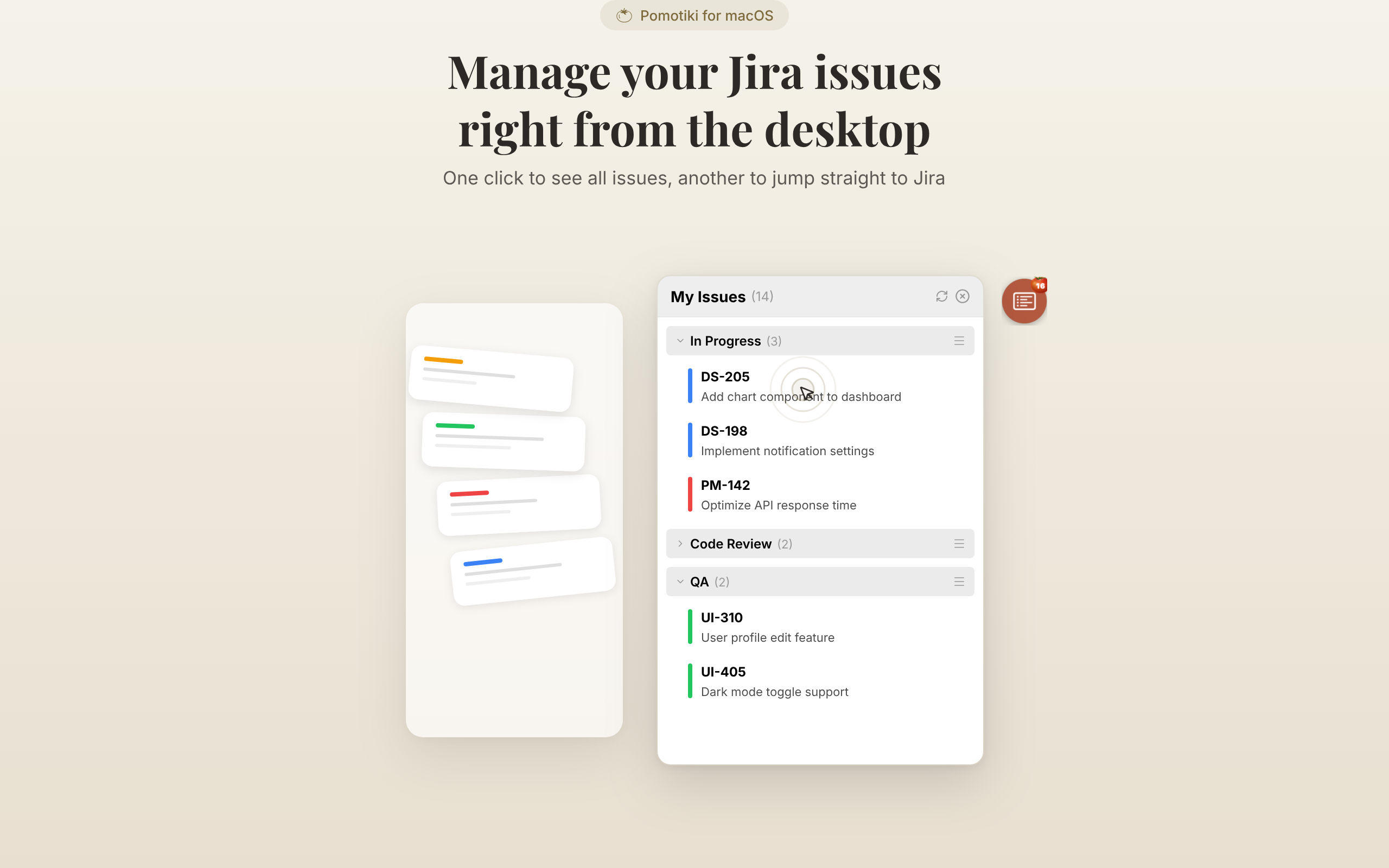
If your work lives in Jira, Pomotiki eliminates the gap between your task board and your focus timer. It's a native macOS app built by DoDraft that puts a small floating tomato icon on your screen. Click it, browse your Jira issues, pick one, and start a 25-minute session. Two clicks to go from "what should I work on?" to actually working on it.
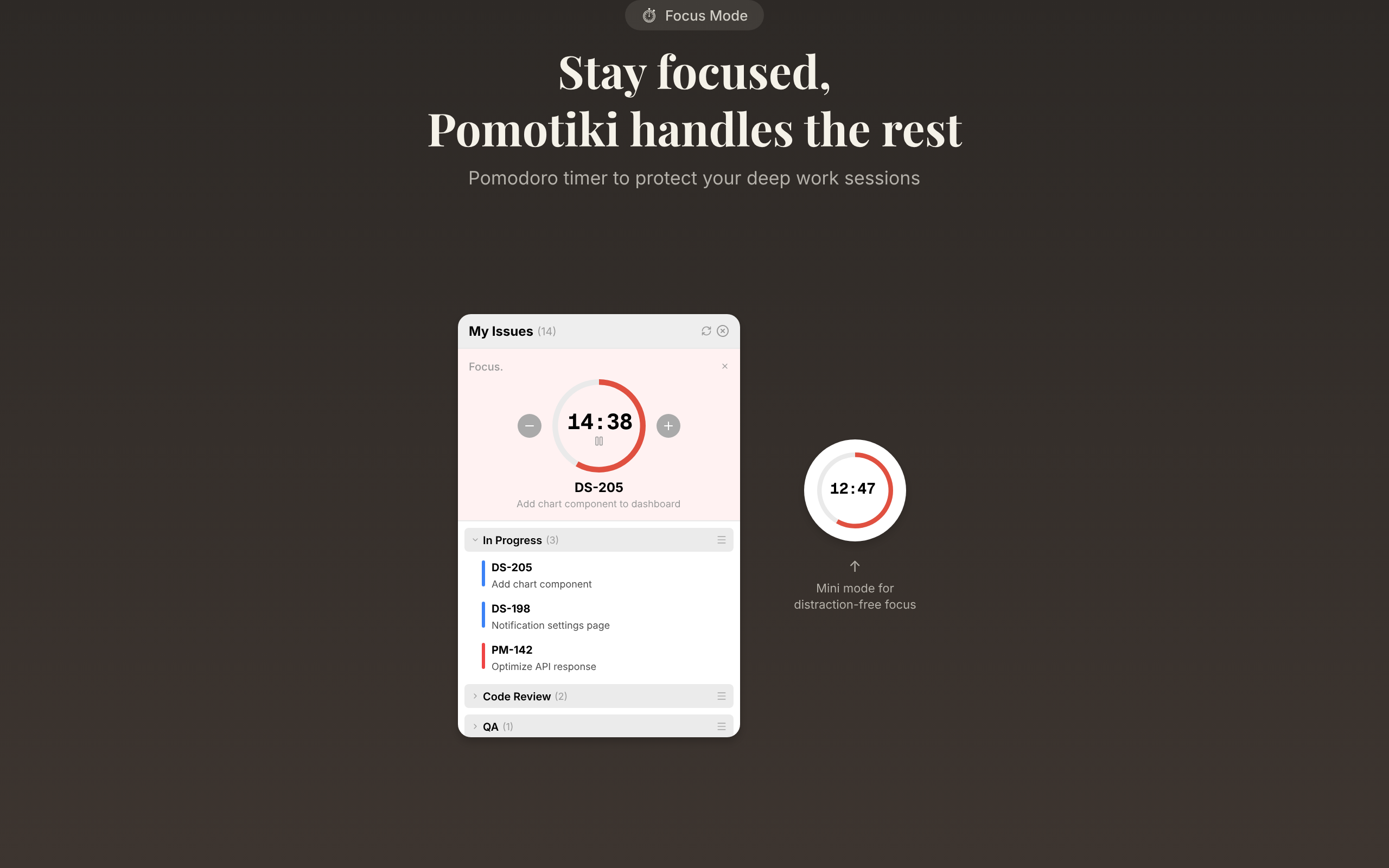
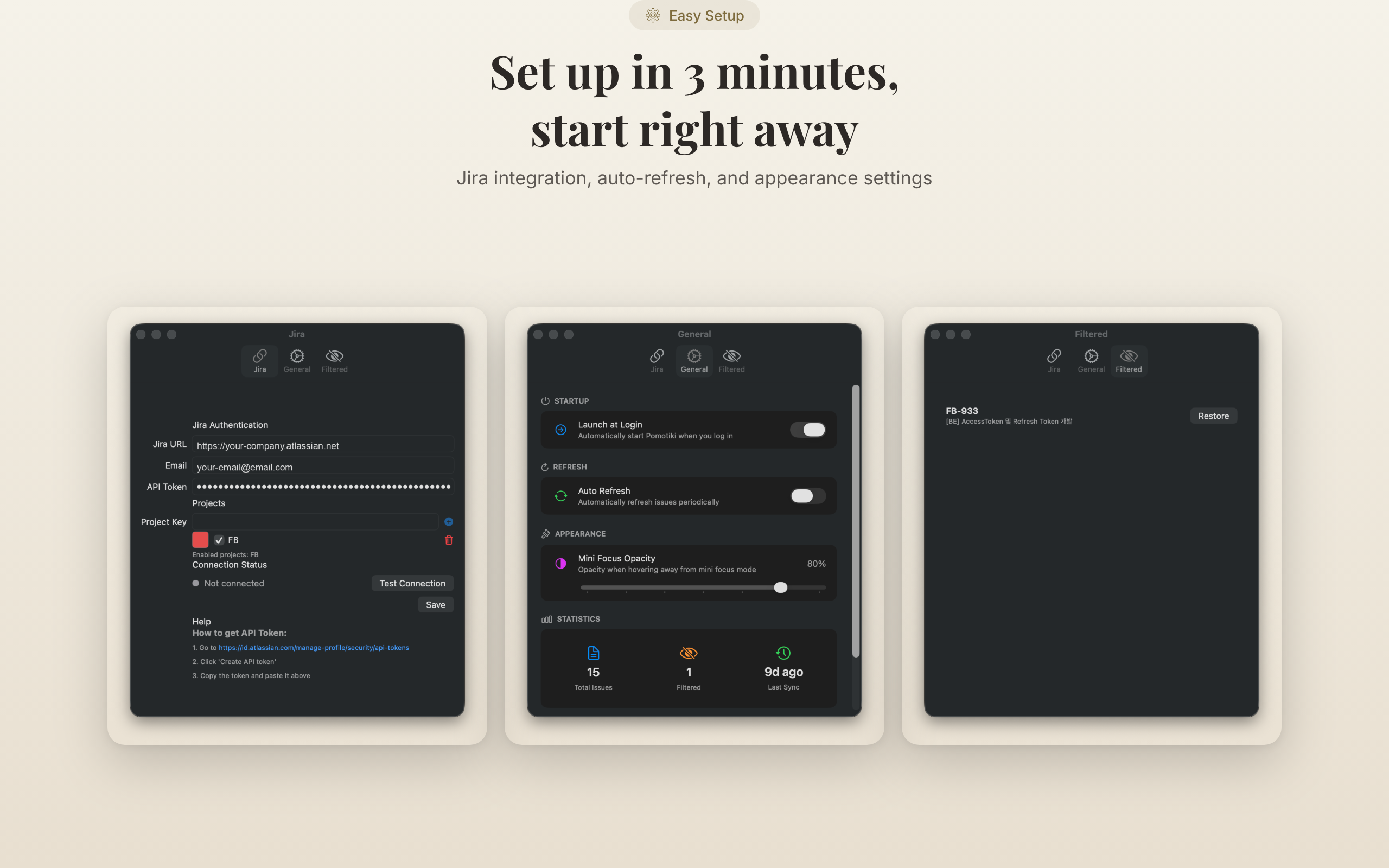
The floating icon stays on top across all macOS Spaces, which means it follows you no matter which virtual desktop you're on. It's draggable and semi-transparent by default - present enough to keep you accountable, subtle enough not to steal screen real estate from your IDE. Hover over it and it becomes fully opaque, showing your current task and remaining time. An adjustable transparency slider lets you dial in exactly how visible you want it to be.
What makes Pomotiki stand apart from every other timer on this list is the direct Jira integration. Instead of manually typing task names or copy-pasting ticket numbers, you browse your actual Jira board from within the app. Each project gets a distinct color bar, so scanning your task list becomes instant visual recognition rather than reading labels. You can also hide stale tickets - those zombie issues that should have been closed three sprints ago - so your focus list only shows what actually matters right now.
The app is entirely free, requires no account, and weighs under 30MB. It's built natively in Swift, not Electron, which means it uses minimal system resources and integrates with macOS system notifications out of the box. Keyboard shortcuts let you start sessions, switch tasks, and navigate without touching your mouse.
One limitation worth noting: Pomotiki currently only integrates with Jira. If your team uses Linear, GitHub Issues, or Asana, you'll need to wait for future updates - though support for additional project management tools is on the roadmap. And if you don't use any project management tool at all, the Jira integration becomes irrelevant, and you might prefer a simpler standalone timer.
Best for: Developers and PMs who live in Jira and want their focus timer connected to their actual task board.
Price: Free
Download: Pomotiki on the Mac App Store
Platform: macOS only
2. Session - Best for Apple Ecosystem Enthusiasts
Session approaches the Pomodoro Technique with a focus on mindfulness, not just productivity. After each work interval, the app encourages you to reflect on how focused you actually were and what distracted you. Over time, this builds a surprisingly useful picture of your attention patterns - not just how many sessions you completed, but how effective they were.
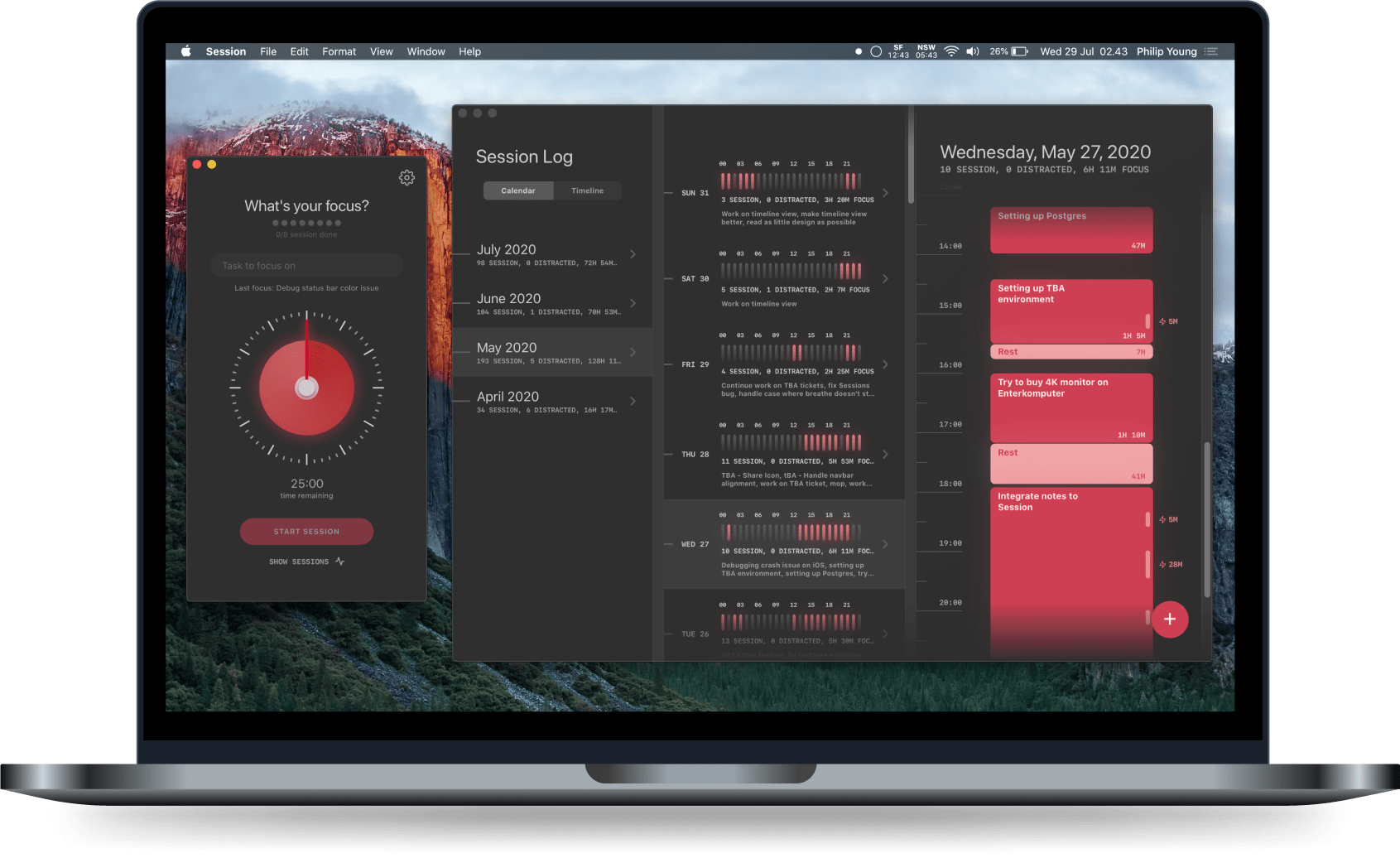
The design is polished and feels right at home on macOS. You get full customization of work and break intervals, daily goals, and the ability to tag tasks for categorization. The analytics dashboard shows your focus habits over time with clean, readable charts. Session also syncs between Mac and iOS, so your data follows you if you switch devices during the day.
On the Mac specifically, Session can block distracting apps and websites during focus periods. It integrates with your calendar to show scheduled events alongside your Pomodoro plan, and it connects to Slack to automatically set your status when you start a session - a small feature that saves you from "are you available?" interruptions during deep work. It also supports Apple Shortcuts and AppleScript for automation-minded users.
The free tier covers the basics, but most of the more interesting features - analytics depth, app blocking, calendar sync - require the Pro plan at $4.99 per month or $39.99 per year. That puts it on the higher end for a timer app, but the mindfulness angle and Slack integration justify the cost for users who want more than a simple countdown.
Best for: Users deep in the Apple ecosystem who want analytics and mindfulness alongside their timer.
Price: Free basic; Pro at $4.99/month or $39.99/year
Platform: macOS, iOS
3. Flow - Best Minimalist Timer
Flow's defining quality is restraint. Open the app and you see a single window with a big timer and almost nothing else. There's no setup wizard, no onboarding flow, no request to create an account. You press start and get to work.

That simplicity is intentional and works well for people who find that feature-heavy apps create more friction than they eliminate. Flow does have a clever feature called Commitment Mode - once you start a session, the stop button disappears until the timer runs out. It's a small psychological trick that works surprisingly well for anyone who tends to bail on focus sessions early. You either sit through the full 25 minutes or close the app entirely. Most people choose to sit.
The free tier is generous. You get unlimited 25/5 Pomodoros with no ads and no sign-up wall. Flow Pro adds app and website blocking (Safari only), calendar sync, data export, and iPhone features like Live Activities and Dynamic Island support. Pricing is reasonable at $1.99 per month, $11.99 per year, or $29.99 for lifetime access.
The app has a clean, native design across Mac, iPhone, iPad, and Apple Watch, with an optional metronome feature that produces a subtle rhythmic tick during sessions. Some users find this helps maintain a sense of forward motion; others turn it off immediately. The point is that Flow gives you the option without drowning you in settings panels.
If there's a downside, it's that Flow doesn't integrate with any external tools. There's no connection to Jira, Asana, Trello, or any task manager. It's purely a timer with optional distraction blocking. For users who want their Pomodoro app to do exactly one thing well, that's a feature, not a limitation. For users who want workflow integration, you'll want to look elsewhere on this list.
Best for: People who want a beautiful, no-nonsense timer without feature bloat.
Price: Free; Pro at $1.99/month, $11.99/year, or $29.99 lifetime
Platform: macOS, iOS, iPadOS, watchOS
4. Focus by Meaningful Things - Best All-Platform Apple Experience
Focus has been around for over ten years, and that longevity shows. It's the most polished Pomodoro app available if you work across multiple Apple devices - Mac, iPhone, iPad, Apple Watch, and even Apple Vision Pro. Sync between devices is instant, so starting a session on your Mac and checking remaining time on your Watch works exactly the way you'd hope.

The app includes built-in task management, which sets it apart from pure timer apps. You can create tasks, assign estimated Pomodoro counts, and track completion without needing a separate to-do app. For people who want a single app that handles both task planning and focused execution, Focus fills that role without requiring you to juggle multiple tools.
The interface has been refined across years of updates and follows Apple's design guidelines closely. It supports macOS Sequoia and includes a redesigned watchOS app for watchOS 11. Notifications, sound customization, and timer display options are all configurable without overwhelming you with choices. Everything feels considered and intentional, which is what you'd expect from a decade of iteration.
The catch is the price. Focus operates on a $39.99 per year subscription, which makes it the most expensive option on this list. There's a 7-day free trial, but no free tier and no lifetime purchase option. For users who only need a timer on their Mac, that annual subscription is hard to justify when free alternatives exist. For users who genuinely work across three or four Apple devices throughout the day and want their timer data everywhere, the cross-platform sync makes it worthwhile.
Best for: Multi-device Apple users who want polished task management integrated with their timer.
Price: $39.99/year (7-day free trial)
Platform: macOS, iOS, iPadOS, watchOS, visionOS
5. Be Focused - Best Budget Option
Be Focused is one of the longest-running Pomodoro apps on the Mac App Store, and its appeal is straightforward: it does the basics reliably, the free version covers most use cases, and the paid upgrade is a one-time purchase of $4.99.
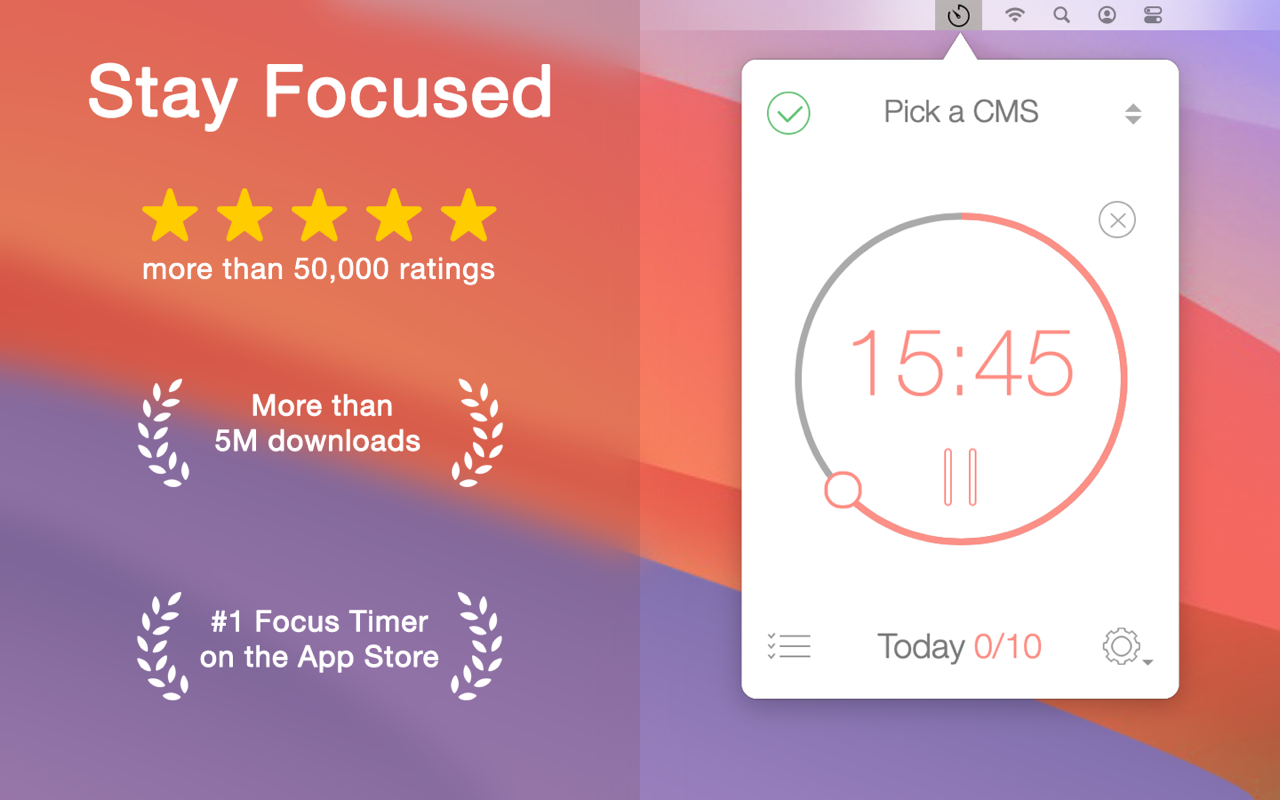
The app runs from your menu bar and includes customizable work and break intervals, a built-in task list, and basic statistics showing your completed sessions over time. The free version handles the standard 25/5 timer with a task list and basic stats. The Pro version adds iCloud sync between Mac and iOS, removes ads, and unlocks additional customization options for timer durations and notification sounds.
There's nothing about Be Focused that will surprise you, and that's partly its strength. It doesn't try to be a project management tool, a mindfulness coach, or an analytics platform. It's a reliable timer with a task list, and it has been doing that job well for years. If that's all you need, it delivers without asking you to learn a new system or commit to a monthly subscription.
The design hasn't changed dramatically over the years, which means it doesn't look quite as modern as Flow or Session. But it's stable, well-maintained, and the one-time $4.99 price for Pro makes it the most affordable paid option on this list by a wide margin. If you're on a budget or you simply believe a timer app shouldn't cost more than a coffee, Be Focused is hard to argue against.
Best for: Users who want a simple, proven timer without a subscription.
Price: Free; Pro at $4.99 one-time
Platform: macOS, iOS
6. TomatoBar - Best for Developers Who Prefer Open Source
TomatoBar is the developer's Pomodoro timer. It's open source under the MIT license, lives entirely in your macOS menu bar, and does exactly one thing: count down your Pomodoro sessions. No accounts, no telemetry, no feature bloat, no upsell screens.
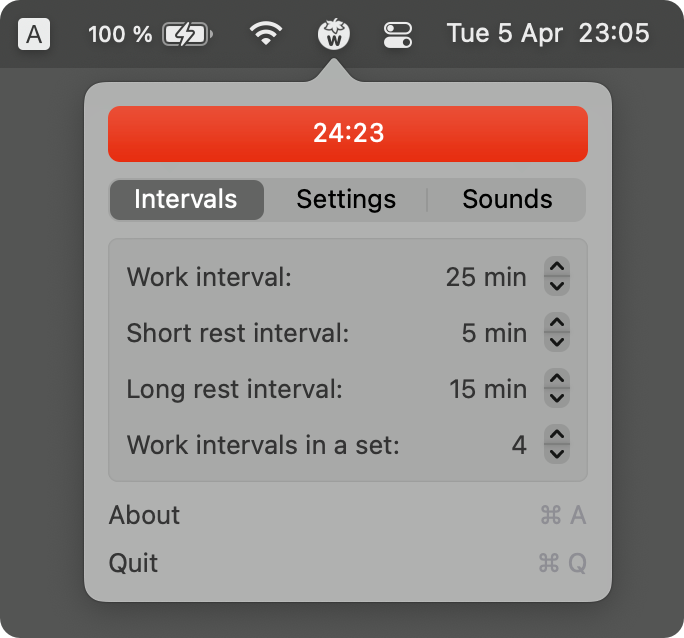
What makes TomatoBar interesting for technical users is what happens under the hood. The app logs state transitions in JSON format to a local file, which means you can pipe that data into your own scripts, dashboards, or productivity analysis tools. It also supports a URL scheme (tomatobar://startStop), so you can start and stop the timer from the command line or integrate it with automation tools like Hammerspoon or Alfred workflows. If you've ever wanted to trigger a Pomodoro session from a shell script, TomatoBar is the only app on this list that makes that possible.
The app is fully sandboxed with no entitlements and zero telemetry - a rare combination even among paid apps. It automatically matches the macOS system theme, supports configurable work and rest intervals, optional sounds, discreet actionable notifications, and global hotkeys. The project is actively maintained on GitHub with releases in early 2026.
TomatoBar doesn't have task management, analytics dashboards, or any integrations with project management tools. It's a timer, full stop. But for developers who want to own their data, extend their tools through scripting, and avoid closed-source dependencies in their daily workflow, it's the obvious pick. You can read the entire codebase before you install it. Not many productivity apps let you say that.
Best for: Developers who value open source, privacy, and scriptability.
Price: Free (open source, MIT license)
Platform: macOS only
7. Chronoid - Best for Time Tracking and Billing
Chronoid takes a different approach by combining automatic time tracking with a built-in Pomodoro timer and website blocker. Instead of just timing your focus sessions, it records exactly which apps and websites you used during each session - useful for freelancers who need to produce timesheets or anyone who wants honest data about where their time actually goes during a workday.
The Pomodoro timer runs from the menu bar, and every session gets automatically logged alongside your regular activity data. An AI-powered chat feature lets you quickly query your time data - asking things like "how many hours did I spend in VS Code this week?" or "what was my most productive day this month?" - which speeds up invoice preparation and weekly reporting without requiring you to manually categorize anything.
All data stays 100% local on your Mac, with no cloud sync and no external data transmission. For users handling sensitive client work or operating under NDAs, this privacy-first approach is a significant advantage over cloud-based tracking tools. The website blocker adds another layer of focus protection during active Pomodoro sessions, so you can keep yourself honest about where your attention goes.
Chronoid costs $49 as a one-time purchase after a 7-day free trial. That's a higher upfront cost than anything else on this list, but the combination of automatic time tracking, Pomodoro timer, website blocking, and AI-powered queries would cost significantly more if you cobbled together separate tools for each function. It makes the most sense for freelancers or contractors who already need a time tracker and want Pomodoro built in rather than bolted on as a separate app.
Best for: Freelancers and contractors who need automatic time tracking alongside their Pomodoro workflow.
Price: $49 one-time (7-day free trial)
Platform: macOS only
Comparison Table
| App | Price | Jira Integration | Other Integrations | Timer Style | Task Management | Analytics | Website Blocking | Open Source | Platforms |
|---|---|---|---|---|---|---|---|---|---|
| Pomotiki | Free | Yes | Roadmap: GitHub, Linear | Floating icon | Via Jira | Basic | No | No | macOS |
| Session | Free / $4.99/mo | No | Slack, Calendar, Shortcuts | Menu bar | Tags | Detailed | Yes (Pro) | No | macOS, iOS |
| Flow | Free / $1.99/mo | No | None | Standalone window | No | Basic (Pro) | Safari only (Pro) | No | macOS, iOS, watchOS |
| Focus | $39.99/yr | No | None | Menu bar | Built-in | Moderate | No | No | macOS, iOS, watchOS, visionOS |
| Be Focused | Free / $4.99 | No | None | Menu bar | Basic list | Basic | No | No | macOS, iOS |
| TomatoBar | Free | No | URL scheme, CLI | Menu bar | No | JSON logs | No | Yes (MIT) | macOS |
| Chronoid | $49 | No | None | Menu bar | No | AI-powered | Yes | No | macOS |
Which App Should You Pick?
The right Pomodoro app depends entirely on what sits at the center of your workflow.
If your team runs on Jira and you want your focus sessions tied to actual tickets, Pomotiki is the only app on this list that does this natively. You pick a Jira issue, start a timer, and the connection between "what you should be doing" and "what you're actually doing" stays visible on screen. It's free and lightweight enough that trying it costs you nothing but a download from the Mac App Store.

If you're deep in the Apple ecosystem and own multiple devices, Focus gives you the best cross-platform sync money can buy, while Session adds a mindfulness layer and Slack integration that remote teams will appreciate for reducing unnecessary interruptions.
If you just want a timer that gets out of the way, Flow's minimalist design and generous free tier make it hard to beat. And if you're a developer who wants complete control over your tools, TomatoBar's open-source codebase and scriptable URL scheme give you full ownership of your productivity data.
For freelancers who bill by the hour, Chronoid is the practical choice - it combines time tracking with Pomodoro in a way that eliminates the need for a separate invoicing tool. And for budget-conscious users who want something simple and proven, Be Focused has been quietly doing its job for years at a one-time cost of $4.99.
The Pomodoro Technique works because it's simple - 25 minutes of focus, a short break, repeat. The best app is the one that makes that cycle fit naturally into your existing workflow without adding complexity. Try a few from this list, keep the one that sticks, and get back to the work that matters.
Frequently Asked Questions
What is the Pomodoro Technique and why does it work?
The Pomodoro Technique divides work into 25-minute focused intervals (called "pomodoros") separated by 5-minute breaks, with a longer 15-30 minute break after every four intervals. It works because it removes the ambiguity of open-ended work blocks. Instead of "I'll work on this for a while," you commit to 25 minutes - short enough that starting feels easy, long enough to make real progress. The mandatory breaks prevent the kind of mental fatigue that leads to diminishing returns in longer sessions.
Do I need a dedicated app, or can I just use my phone's built-in timer?
You can absolutely use any countdown timer and still benefit from the technique. But a dedicated Pomodoro app adds structure that a basic timer cannot provide - automatic break scheduling, session counting, task association, and historical tracking. The real value of a dedicated app shows up over weeks, not days. When you can look back and see that you averaged 6 focused sessions on Mondays but only 3 on Fridays, you start making better decisions about how you schedule your most demanding work.
Can Pomotiki work with Jira Cloud and Jira Data Center?
Yes. Pomotiki's built-in adapter handles the different pagination formats that Jira Cloud and Jira Data Center return. Whether your organization runs Jira in the cloud or self-hosted, the integration connects and syncs your issues without additional configuration. You authenticate with your Jira credentials once, and the app handles the API differences behind the scenes.
Which Pomodoro app is best for remote teams?
For teams already using Jira, Pomotiki makes it easy for every team member to focus on assigned tickets without switching between apps. Session is another strong option for teams because of its Slack integration - it automatically sets your status when you start a focus session, which signals to colleagues that you're in deep work and reduces drive-by interruptions. Most other apps on this list are designed primarily for individual use.
Are there any completely free Pomodoro apps for Mac with no limitations?
Yes. Both Pomotiki and TomatoBar are completely free with no paid tiers, no feature gating, and no ads. Pomotiki gives you full Jira integration and a floating timer at no cost, while TomatoBar offers an open-source menu bar timer with JSON logging and CLI control. Flow and Be Focused also have functional free tiers that handle the core Pomodoro workflow, though their premium features like website blocking and cloud sync require payment.

Enjoyed this post?
Subscribe to our newsletter and get notified when we publish new articles.